Ryobi moisture-meter decoder
The Ryobi ES3000 is a moisture meter from the Phone Works range. Its pins go into the material being measured, but the reading appears in a phone app. The meter connects through the phone’s headphone jack, using audio signals to communicate with the app.
I had one connected to my Mac in the shop and wanted to make it useful again. I asked Codex to investigate how to read it, while I handled the meter and tried it on the materials around me. The manual and an archived Android app provided enough information to reconstruct the exchange. Codex examined the app’s code and implemented the capture and decoding tools.
Reconstructing the exchange
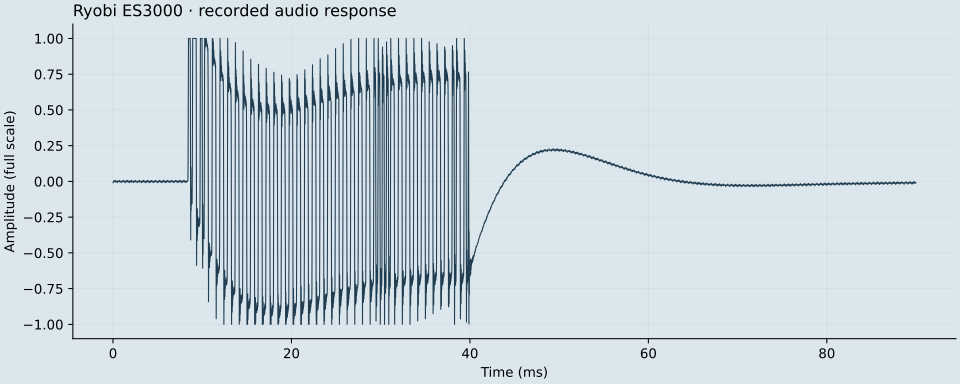
The request uses both stereo channels: a continuous 2.2 kHz square wave on the left and short request bursts on the right. The meter sends a pulse train back through the microphone input. Reproducing both parts of the request made it possible to generate the tone in Python and decode the reply without running the phone app.
Turning pulses into a reading
The decoder looks for a frame prefix, extracts the device identifier and moisture payload, and applies the app’s conversion table for the selected material. The material choice matters because the same raw value can map to different percentages. Saved WAV captures let Codex work on the decoder against the same input while I changed the physical setup for the next measurement.
Checking that contact changed the response
Air and the tested dry wood both returned a raw value of 6, which the hardwood table displays as 0.0%. A wet finger across the pins returned 26–27, and a damp cloth returned 19. Those observations showed that probe contact changed the response, although the wood result could still reflect poor contact or the bottom of the app’s display range. Establishing moisture accuracy requires paired readings against a reference meter; the logging tool can save those comparisons alongside the captures.